Reviewing your competency assessment results and assessor feedback helps you understand where you performed well and what to focus on next. If you received a Not Yet Competent result, it also shows you what your assessor needed to see.
Steps
Step 1: Check your inbox
- Look for the email you received when your result was recorded.
- Select View Outcome in the email. This takes you straight to your results — skip ahead to Step 4.
If you don't have the email, or can't locate it, continue to Step 2 below.
Step 2: Locate your competency assessment
-
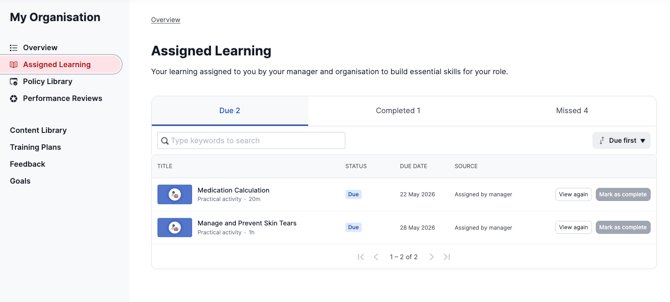
Go to your My Organisation staff portal and navigate to your Assigned Learning list. Your competency assessment will appear as a Practical Activity type.
-
If you were marked as Competent, the activity will appear in your completed list. If it's still showing as due, your assessment may not have been submitted yet or you received a Not Yet Competent result.
- Alternatively, search for the competency in your Content Library.
Step 3: Find your results in the outcomes table
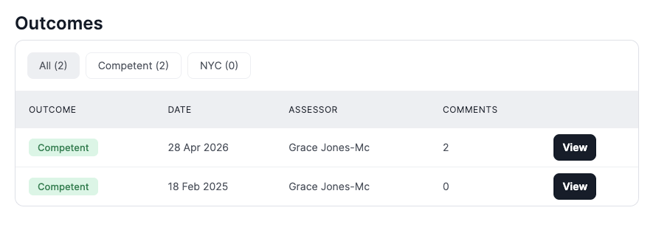
On the Practical Activity page, scroll down to the outcomes table. This displays all assessment outcomes recorded over time, including whether you were marked as Competent or Not Yet Competent. Locate the relevant result and click View to open the results page.
Can't see your results? If the outcomes table isn't visible or your result isn't showing, it's possible your assessor didn't record your assessment using Ausmed Competency™. Reach out to your Assessor or Manager to confirm how your results were recorded.
Step 4: Review your results and feedback
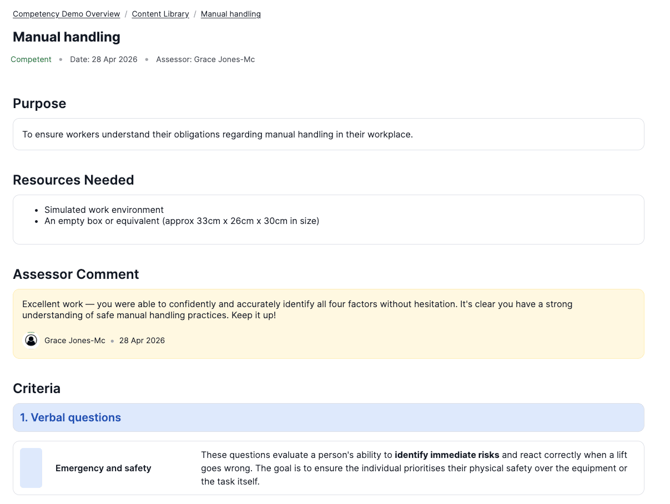
On the results page you will be able to see an overall comment from your assessor at the top of the page (if provided), your result against each individual criterion, and any comments left against individual criteria: