---
title: Update your email or password
description: Update your email or password within your account settings.
---
[Skip to content](https://learnersupport.ausmed.com.au/support/update-your-email-or-password#main-content)
[More support](https://learnersupport.ausmed.com.au/support/kb-tickets/new?hsLang=en)

Open main navigation
Close main navigation
- [More support](https://learnersupport.ausmed.com.au/support/kb-tickets/new)
- [Submit Help Request](https://learnersupport.ausmed.com.au/support/kb-tickets/new)
[Submit Help Request](https://learnersupport.ausmed.com.au/support/kb-tickets/new?hsLang=en)
How can we help you?
- There are no suggestions because the search field is empty.
1. [Learner Support Centre](https://learnersupport.ausmed.com.au/support?hsLang=en)
2. [Account Settings](https://learnersupport.ausmed.com.au/support/account-settings?hsLang=en)
# Update your email or password
## Learn how to update your account email or password
### Update your account email or password on the Ausmed website
**Steps**
1\. [Log in to your account](https://www.ausmed.com.au/sign-in).
2\. Click on your initials (or picture) in the top right-hand menu bar.
3\. Click **Account** **settings** from the dropdown menu.
4\. Click **Account details** and enter a new **Account Email.**

📝 **Note:** If you're connected to an organisation using Ausmed, you may notice a Work Email listed below your Account Email. This is managed by your organisation and can’t be changed.
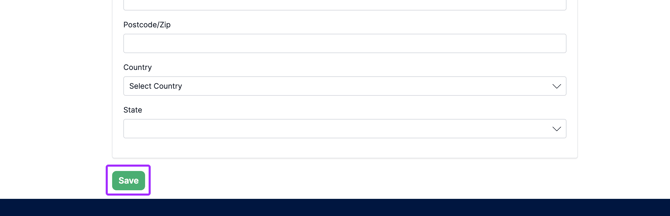
5\. To save your new email, scroll to the bottom of the page and click **Save.**
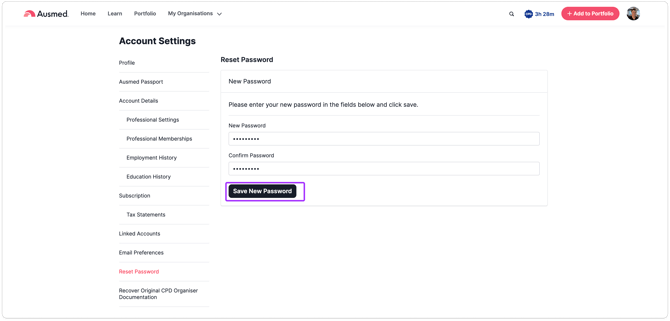
6\. To update your password, click **Reset Password.**
7\. Enter a new password and click **Save New Password.**
📝 **Note:** If your organisation uses **Single Sign-On (SSO)**, updating your password in Ausmed **won’t change your SSO login details**. You’ll still need to log in with your SSO credentials.
---
### Updating your email or password using the **Ausmed** **App:**
1\. Open the Ausmed App.
2\. Click **Settings** in the bottom right corner.
3\. Tap **Profile** **Settings** to update your email address or **Reset** **Password** to change your password.
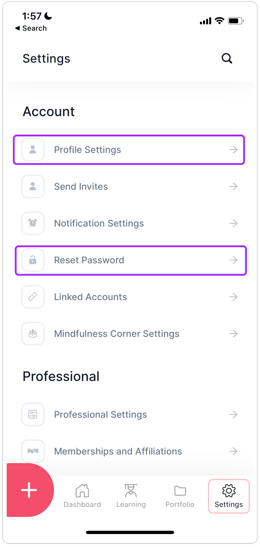
4\. Enter your new password or email. Tap **Save** to finish.

**Note:**
On the app, you will stay logged in for 180 days and your password will be updated on all devices.
- [Getting started](https://learnersupport.ausmed.com.au/support/getting-started?hsLang=en)
- [Portfolio & CPD](https://learnersupport.ausmed.com.au/support/portfolio-cpd?hsLang=en)
- [Learning](https://learnersupport.ausmed.com.au/support/learning?hsLang=en#main-content)
- [Certificates of completion](https://learnersupport.ausmed.com.au/support/learning?hsLang=en#certificates-of-completion)
- [Training modules](https://learnersupport.ausmed.com.au/support/learning?hsLang=en#training-modules)
- [Ausmed Passport](https://learnersupport.ausmed.com.au/support/learning?hsLang=en#ausmed-passport)
- [Skill Tracks](https://learnersupport.ausmed.com.au/support/learning?hsLang=en#skill-tracks)
- [Professional Indemnity Insurance (PII)](https://learnersupport.ausmed.com.au/support/professional-indemnity-insurance-pii?hsLang=en)
- [My Organisation](https://learnersupport.ausmed.com.au/support/my-organisation?hsLang=en#main-content)
- [Getting Started](https://learnersupport.ausmed.com.au/support/my-organisation?hsLang=en#getting-started)
- [Assigned Learning](https://learnersupport.ausmed.com.au/support/my-organisation?hsLang=en#assigned-learning)
- [Performance Reviews](https://learnersupport.ausmed.com.au/support/my-organisation?hsLang=en#performance-reviews)
- [Policies](https://learnersupport.ausmed.com.au/support/my-organisation?hsLang=en#policies)
- [Competency](https://learnersupport.ausmed.com.au/support/my-organisation?hsLang=en#competency)
- [Ausmed Subscription](https://learnersupport.ausmed.com.au/support/ausmed-subscription?hsLang=en)
- [Account Settings](https://learnersupport.ausmed.com.au/support/account-settings?hsLang=en)
- [Troubleshooting and FAQs](https://learnersupport.ausmed.com.au/support/troubleshooting-and-faqs?hsLang=en#main-content)
- [Ausmed Passport](https://learnersupport.ausmed.com.au/support/troubleshooting-and-faqs?hsLang=en#ausmed-passport)
- [Portfolio & CPD](https://learnersupport.ausmed.com.au/support/troubleshooting-and-faqs?hsLang=en#portfolio-cpd)
- [General](https://learnersupport.ausmed.com.au/support/troubleshooting-and-faqs?hsLang=en#general)
- [Account Settings](https://learnersupport.ausmed.com.au/support/troubleshooting-and-faqs?hsLang=en#account-settings)
- [My Organisation](https://learnersupport.ausmed.com.au/support/troubleshooting-and-faqs?hsLang=en#my-organisation)
[](https://www.ausmed.com.au)
1/171 La Trobe Street, Melbourne VIC 3000
Copyright © 2025, Ausmed Education Pty Ltd
[mailto:support@ausmed.com.au](mailto:support@ausmed.com.au)
P: 1300 287 633
E: support@ausmed.com.au